> ## Documentation Index
> Fetch the complete documentation index at: https://mintlify.com/wezterm/wezterm/llms.txt
> Use this file to discover all available pages before exploring further.
# Terminal Basics
> Understanding terminal emulators, PTYs, and how WezTerm works
WezTerm is a terminal emulator, but what exactly does that mean? This guide explains the fundamental concepts of terminals, PTYs, and how they relate to shells and programs.
## What is a Terminal?
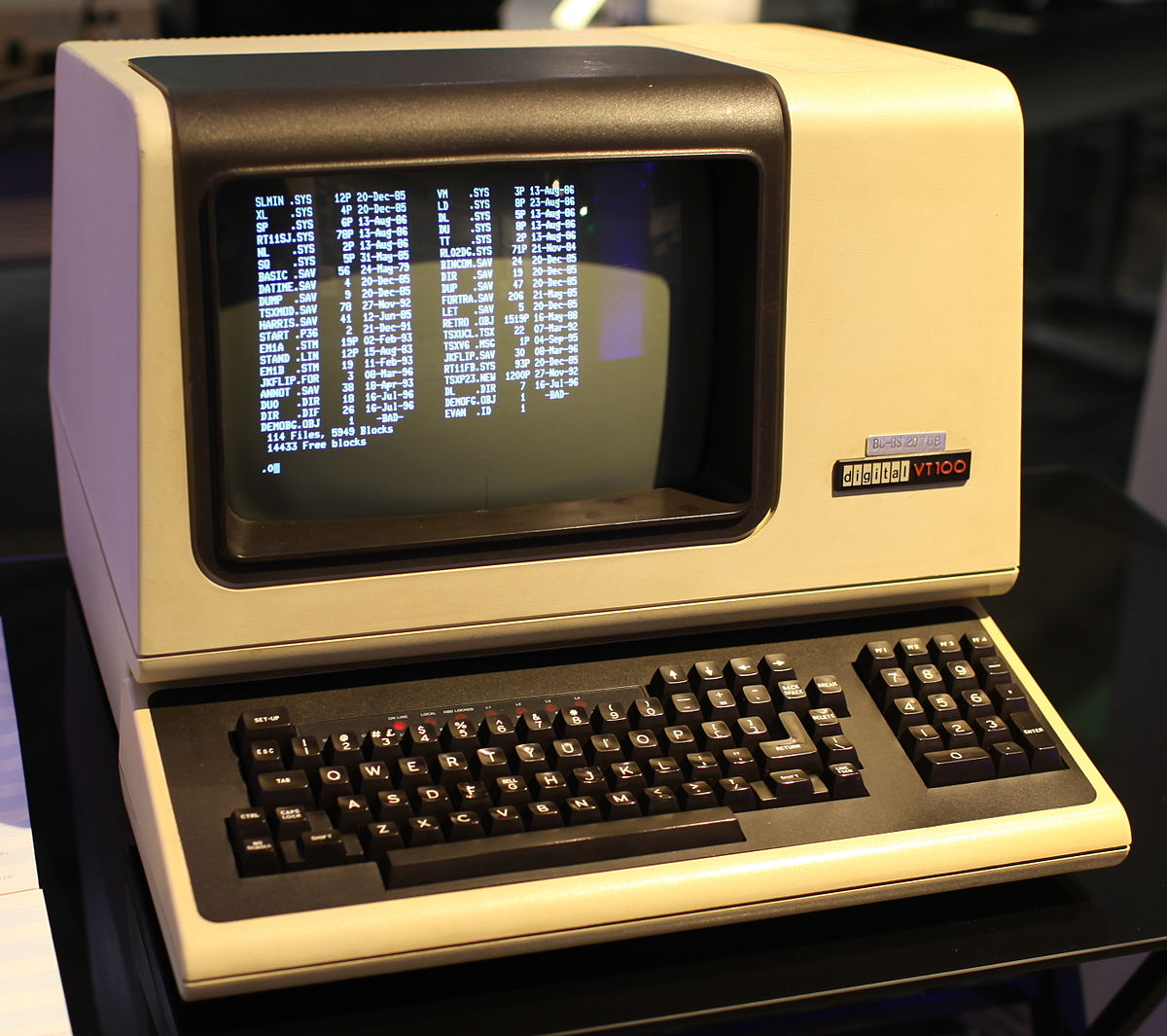
A **terminal** is a device used for entering data into (input) and presenting data from (output) a computer system.
Early terminals were physical devices with keyboards and paper or screen displays that communicated with computer systems using serial connections. While modern terminals are software applications running in graphical environments, they still emulate the behavior of these historical devices.
 ## Terminal Architecture
Understanding how terminals work requires knowing about several interconnected components:
On Unix systems, the kernel provides a TTY subsystem that manages:
* Input data stream (keyboard)
* Output data stream (display)
* Flow control and signal management
* Basic stream operations like line buffering
A shell (like bash, zsh, or fish) interprets your commands and launches programs. It communicates with the terminal through the TTY interface.
WezTerm and other terminal emulators create a graphical window that emulates a physical terminal device, interpreting escape sequences to display formatted text.
### Data Flow
```mermaid theme={null}
flowchart LR
subgraph Kernel
TTY["TTY/PTY Interface"]
end
subgraph Userspace
SHELL["Shell (bash/zsh)"] <--> TTY
SHELL -. spawns .-> APP
APP["Applications (vim, etc.)"] <--> TTY
end
TTY <--> TE["Terminal Emulator (WezTerm)"]:::wezterm
classDef wezterm stroke:#00F,stroke-width:2px
```
## ANSI Escape Sequences
Terminals use **ANSI escape sequences** to control text formatting, colors, cursor positioning, and other display features. These are special byte sequences that begin with the ESC character (0x1B).
The ANSI X3.64 standard (also published as ECMA-48) standardized these escape sequences to ensure compatibility across different terminal implementations.
For example:
* `\033[1m` - Bold text
* `\033[31m` - Red text color
* `\033[2J` - Clear screen
### Terminfo and Terminal Capabilities
Since not all terminals support the same features, systems use terminal capability databases:
* **termcap** - Original terminal capability database
* **terminfo** - Modern, more extensible successor
Applications use the `TERM` environment variable to look up the correct escape sequences for your terminal. WezTerm typically sets `TERM=xterm-256color` or similar.
The terminfo database allows applications to work correctly across different terminal emulators without hardcoding escape sequences.
## Standard Streams
Unix programs use three standard I/O streams:
File descriptor 0 - Receives input from the terminal (typically keyboard input)
File descriptor 1 - Normal program output sent to the terminal display
File descriptor 2 - Error messages and diagnostics, also sent to the terminal display
From the terminal's perspective, `stdout` and `stderr` are the same stream. The terminal only has a single output channel.
## Pseudo Terminals (PTY)
Modern terminal emulators like WezTerm use **PTYs (Pseudo Terminal teletYpes)** - virtual TTY interfaces that exist entirely in software.
A PTY has two sides:
* **Controller side** (master) - Managed by the terminal emulator (WezTerm)
* **Client side** (slave) - Connected to the shell and applications
```mermaid theme={null}
flowchart TB
subgraph Kernel
PTYC["PTY Client\n(/dev/pts/0)"]
PTYM[PTY Controller]
PTYC <--> PTYM
end
subgraph Userspace
SHELL["Shell"] <--> PTYC
SHELL -. spawns .-> APP["Application"]
APP <--> PTYC
PTYM <--> TE["WezTerm"]:::wezterm
end
classDef wezterm stroke:#00F,stroke-width:2px
```
### PTY Features
PTYs provide:
* Window size information (rows and columns)
* Signal handling (Ctrl+C, Ctrl+Z)
* Dynamic resizing notifications
* Multiple virtual terminals from a single application
## Signals and Job Control
The TTY/PTY layer translates certain key combinations into signals:
| Key Combination | Signal | Default Behavior |
| --------------- | ------- | ----------------------------- |
| `Ctrl+C` | SIGINT | Interrupt (terminate) program |
| `Ctrl+Z` | SIGTSTP | Suspend program |
| `Ctrl+\` | SIGQUIT | Quit with core dump |
| `Ctrl+D` | EOF | End of input |
Signals are handled by the kernel based on TTY settings, not by WezTerm directly. The terminal emulator only sends the raw key codes.
## Windows and ConPTY
Windows historically used a different console architecture than Unix systems. Modern Windows includes **ConPTY** (Console Pseudo-Terminal), which provides PTY-like functionality.
When running on Windows, WezTerm uses ConPTY along with a helper process (`openconsole.exe` or `conhost.exe`) to translate between Unix-style terminal semantics and Windows console APIs.
Key differences:
* ConPTY includes its own terminal emulator layer
* Must maintain backwards compatibility with legacy Windows console programs
* Some edge cases behave differently than Unix PTYs
For the best experience with Unix-like environments on Windows, consider using `wezterm ssh` to connect to WSL, a VM, or remote system with a "real" Unix PTY.
## Running Programs
When a shell spawns a child process:
1. The shell passes the PTY file descriptors to the child
2. The child process writes directly to the PTY
3. The shell is not involved in data transfer
4. The foreground process receives keyboard input and signals
Only the foreground process is considered "active" for receiving input and signals. Background processes (started with `&`) continue running but don't receive terminal input.
## Key Takeaways
Each tab or pane in WezTerm gets its own PTY, which acts as a virtual terminal device.
Your shell (bash, zsh, etc.) reads commands and launches programs, but doesn't control terminal display.
Applications send ANSI escape sequences through the PTY to control colors, cursor position, and text formatting.
WezTerm reads escape sequences from the PTY and renders them in the GPU-accelerated display.
## Learn More
* [Multiplexing](/concepts/multiplexing) - Learn about WezTerm's tabs, panes, and domains
* [Shell Integration](/concepts/shell-integration) - Enhanced shell features with OSC sequences
* [Escape Sequences](https://wezfurlong.org/wezterm/escape-sequences.html) - Complete reference
## Terminal Architecture
Understanding how terminals work requires knowing about several interconnected components:
On Unix systems, the kernel provides a TTY subsystem that manages:
* Input data stream (keyboard)
* Output data stream (display)
* Flow control and signal management
* Basic stream operations like line buffering
A shell (like bash, zsh, or fish) interprets your commands and launches programs. It communicates with the terminal through the TTY interface.
WezTerm and other terminal emulators create a graphical window that emulates a physical terminal device, interpreting escape sequences to display formatted text.
### Data Flow
```mermaid theme={null}
flowchart LR
subgraph Kernel
TTY["TTY/PTY Interface"]
end
subgraph Userspace
SHELL["Shell (bash/zsh)"] <--> TTY
SHELL -. spawns .-> APP
APP["Applications (vim, etc.)"] <--> TTY
end
TTY <--> TE["Terminal Emulator (WezTerm)"]:::wezterm
classDef wezterm stroke:#00F,stroke-width:2px
```
## ANSI Escape Sequences
Terminals use **ANSI escape sequences** to control text formatting, colors, cursor positioning, and other display features. These are special byte sequences that begin with the ESC character (0x1B).
The ANSI X3.64 standard (also published as ECMA-48) standardized these escape sequences to ensure compatibility across different terminal implementations.
For example:
* `\033[1m` - Bold text
* `\033[31m` - Red text color
* `\033[2J` - Clear screen
### Terminfo and Terminal Capabilities
Since not all terminals support the same features, systems use terminal capability databases:
* **termcap** - Original terminal capability database
* **terminfo** - Modern, more extensible successor
Applications use the `TERM` environment variable to look up the correct escape sequences for your terminal. WezTerm typically sets `TERM=xterm-256color` or similar.
The terminfo database allows applications to work correctly across different terminal emulators without hardcoding escape sequences.
## Standard Streams
Unix programs use three standard I/O streams:
File descriptor 0 - Receives input from the terminal (typically keyboard input)
File descriptor 1 - Normal program output sent to the terminal display
File descriptor 2 - Error messages and diagnostics, also sent to the terminal display
From the terminal's perspective, `stdout` and `stderr` are the same stream. The terminal only has a single output channel.
## Pseudo Terminals (PTY)
Modern terminal emulators like WezTerm use **PTYs (Pseudo Terminal teletYpes)** - virtual TTY interfaces that exist entirely in software.
A PTY has two sides:
* **Controller side** (master) - Managed by the terminal emulator (WezTerm)
* **Client side** (slave) - Connected to the shell and applications
```mermaid theme={null}
flowchart TB
subgraph Kernel
PTYC["PTY Client\n(/dev/pts/0)"]
PTYM[PTY Controller]
PTYC <--> PTYM
end
subgraph Userspace
SHELL["Shell"] <--> PTYC
SHELL -. spawns .-> APP["Application"]
APP <--> PTYC
PTYM <--> TE["WezTerm"]:::wezterm
end
classDef wezterm stroke:#00F,stroke-width:2px
```
### PTY Features
PTYs provide:
* Window size information (rows and columns)
* Signal handling (Ctrl+C, Ctrl+Z)
* Dynamic resizing notifications
* Multiple virtual terminals from a single application
## Signals and Job Control
The TTY/PTY layer translates certain key combinations into signals:
| Key Combination | Signal | Default Behavior |
| --------------- | ------- | ----------------------------- |
| `Ctrl+C` | SIGINT | Interrupt (terminate) program |
| `Ctrl+Z` | SIGTSTP | Suspend program |
| `Ctrl+\` | SIGQUIT | Quit with core dump |
| `Ctrl+D` | EOF | End of input |
Signals are handled by the kernel based on TTY settings, not by WezTerm directly. The terminal emulator only sends the raw key codes.
## Windows and ConPTY
Windows historically used a different console architecture than Unix systems. Modern Windows includes **ConPTY** (Console Pseudo-Terminal), which provides PTY-like functionality.
When running on Windows, WezTerm uses ConPTY along with a helper process (`openconsole.exe` or `conhost.exe`) to translate between Unix-style terminal semantics and Windows console APIs.
Key differences:
* ConPTY includes its own terminal emulator layer
* Must maintain backwards compatibility with legacy Windows console programs
* Some edge cases behave differently than Unix PTYs
For the best experience with Unix-like environments on Windows, consider using `wezterm ssh` to connect to WSL, a VM, or remote system with a "real" Unix PTY.
## Running Programs
When a shell spawns a child process:
1. The shell passes the PTY file descriptors to the child
2. The child process writes directly to the PTY
3. The shell is not involved in data transfer
4. The foreground process receives keyboard input and signals
Only the foreground process is considered "active" for receiving input and signals. Background processes (started with `&`) continue running but don't receive terminal input.
## Key Takeaways
Each tab or pane in WezTerm gets its own PTY, which acts as a virtual terminal device.
Your shell (bash, zsh, etc.) reads commands and launches programs, but doesn't control terminal display.
Applications send ANSI escape sequences through the PTY to control colors, cursor position, and text formatting.
WezTerm reads escape sequences from the PTY and renders them in the GPU-accelerated display.
## Learn More
* [Multiplexing](/concepts/multiplexing) - Learn about WezTerm's tabs, panes, and domains
* [Shell Integration](/concepts/shell-integration) - Enhanced shell features with OSC sequences
* [Escape Sequences](https://wezfurlong.org/wezterm/escape-sequences.html) - Complete reference